
What would you do with such large screen? Watching movies should be one of the entertainment ways you would make use with Note.
Watch Video Tutorial for ripping DVD movies to videos right now on YouTube.
Actually, Samsung Galaxy Note is not considered to be a smart phone as soon as it was released last year but tend to say it is a smart phone + small tablet combination.
I believe that Note is popular for male users but not female users. It is too large to be a true mobile phone and not convenient to carry by hands. Male users may use it for business while female users may just ignore it and watch iPhone or S2 for most.
On the other hand, it is not a real tablet as it is too small with its 5.3-inch screen. For me, I would like to buy iPad with lower and good price now because the new iPad was released in March. iPad is a true tablet, and it is not expensive now.
However, can not deny that Samsung is a good brand in screen development. Samsung tablets or mobile phones performs perfectly in screen resolution. That is true. For Note users, may want to watch video on the go to work or on the way abroad.
How to watch videos with Samsung Galaxy Note?
That would not be easier until you get Any DVD Cloner Platinum.
Step 1: Insert DVD into DVD burner and launch Any
DVD Cloner platinum, Any DVD Cloner platinum can recognize the your DVD
burner path automatcailly, then click "Open DVD" button to load the DVD stucture.
Step 2: Go to "DVD Ripper":
Select "Samsung Galaxy Note" mode.
Select "Samsung Galaxy Note" mode.
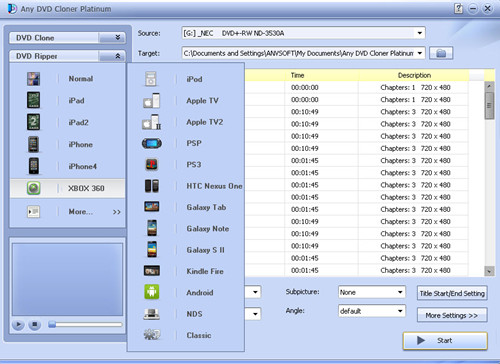
Step 3: Click "More Settings " button to customize video and audio parameters.
Step 4: Retun to DVD Ripper interface, and confirm MP4 is selected in "Output Format".
Note: MKV, AVI, OGM and M4V also can be selected for playback on other portable players.
Step 5: Click "Start" to begin the ripping process.
Step 6: Transfer the file to your samsung galaxy note and you can enjoy the movie without any location or time limitations!
Tips: Users can open or download Any DVD Cloner Platinum complete manual for reference.

No comments:
Post a Comment